
Avast Antivirus 2026 :
Free Tier vs Premium Suite
We tested Avast across 45 days, checked independent lab scores, dissected every pricing tier, and talked to real users. Here’s the full, no-fluff breakdown — so you only pay for what you actually need.
Why We Ran This Audit in 2026
Avast is one of the most downloaded antivirus programs on the planet — its free tier alone draws in students, older laptops, and anyone who wants baseline protection without opening their wallet. But cybersecurity in 2026 looks very different from even two years ago. AI-powered phishing campaigns, deepfake-assisted fraud, and polymorphic ransomware have all entered the mainstream threat landscape.
So the question we set out to answer is simple: does Avast still hold up? And more importantly — does the free version do enough, or is the Premium upgrade genuinely necessary? We spent 45 days testing both, cross-referenced AV-Test’s January–February 2026 results, and dug into real pricing from Avast’s own site to give you the clearest comparison on the web.
What Is Avast in 2026?
Founded in 1988, Avast is now owned by Gen Digital — the same umbrella company behind Norton, LifeLock, Avira, and AVG. Its freemium model, launched in 2001, helped it build a user base of over 400 million worldwide. Today, Avast’s product line has been consolidated into four primary offerings:
- Real-time virus & malware protection
- Basic ransomware detection
- Wi-Fi network scanner
- No enhanced firewall
- No anti-phishing shield
- 1 device only
- Everything in Free
- Enhanced Firewall
- Ransomware Shield
- Webcam Shield
- Anti-phishing + Email Guard
- Up to 10 devices
- Everything in Premium
- SecureLine VPN (unlimited)
- Cleanup Premium (PC optimizer)
- AntiTrack (privacy blocker)
- Up to 10 devices
Feature-by-Feature Comparison: Free vs Premium
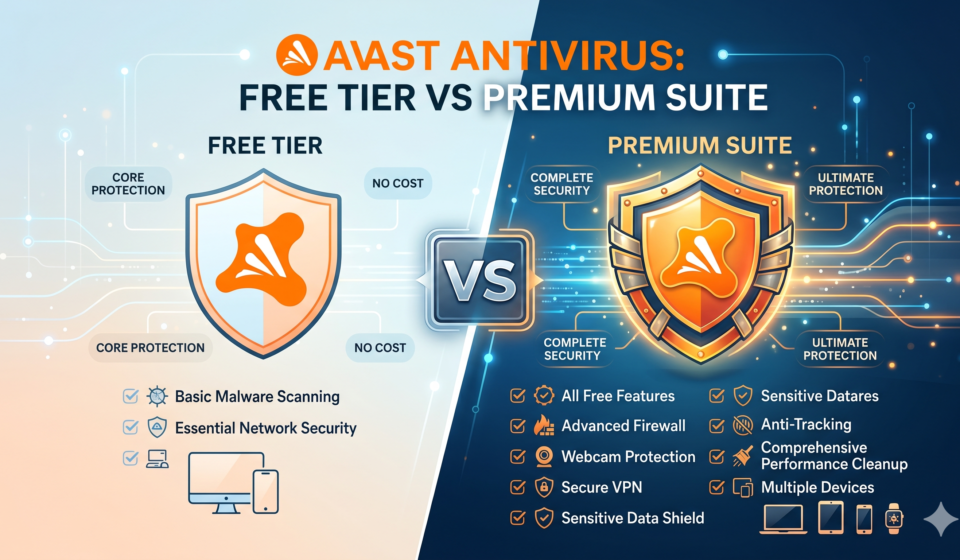
The most important question for most readers: what exactly do you lose by staying on the free plan? We mapped every major feature across both tiers.
| Feature | Free Tier | Premium Security | Ultimate |
|---|---|---|---|
| Real-time malware & virus protection | ✓ | ✓ | ✓ |
| Smart scan (quick scan) | ✓ | ✓ | ✓ |
| Deep (full system) scan | ✓ | ✓ | ✓ |
| Boot-time scan | ✓ | ✓ | ✓ |
| Wi-Fi network inspector | ✓ | ✓ | ✓ |
| Basic ransomware detection | ⚠ Limited | ✓ Full | ✓ Full |
| Enhanced Firewall | ✗ | ✓ | ✓ |
| Ransomware Shield (Folder Lock) | ✗ | ✓ | ✓ |
| Webcam Shield | ✗ | ✓ | ✓ |
| Anti-phishing protection | ✗ | ✓ | ✓ |
| Email Guard (Gmail/Outlook) | ✗ | ✓ | ✓ |
| AI scam detection (Web Guard) | ✗ | ✓ | ✓ |
| SMS/call scam guidance | ✗ | ✓ | ✓ |
| Deepfake video detection | ✗ | ✓ | ✓ |
| SecureLine VPN (unlimited) | ✗ | ✗ | ✓ |
| Cleanup Premium (optimizer) | ✗ | ✗ | ✓ |
| AntiTrack (privacy) | ✗ | ✗ | ✓ |
| Device coverage | 1 device | 1 or 10 devices | Up to 10 devices |
2026 Independent Lab Scores
We don’t just take Avast’s word for it. Here’s how they performed in the most recent AV-Test evaluation (January–February 2026) — the gold standard for antivirus benchmarking.
The perfect 6/6 scores from AV-Test reflect the Premium version’s engine. Independent in-house testing by Cybernews found the free tier’s real-time protection achieved only a 63% success rate — respectable, but not confidence-inspiring if you’re dealing with sensitive data.
Pricing Breakdown (2026)
Avast prices shift frequently and the intro rate often differs significantly from the renewal price. Here’s the current landscape as of April 2026:
| Plan | Intro Price (Year 1) | Renewal Price | Devices |
|---|---|---|---|
| Free Antivirus | $0 | $0 | 1 |
| Premium Security (1 PC) | ~$31.20/yr | ~$99.99/yr | 1 |
| Premium Security (10 devices) | ~$39.99/yr | ~$99.99/yr | Up to 10 |
| Ultimate Suite | ~$55.99/yr | ~$139.99/yr | Up to 10 |
| Cleanup Premium (add-on) | $29.88/yr | Varies | 1 |
| Driver Updater (add-on) | $43.99/yr | Varies | 1 PC |
Try Avast Premium — Risk Free for 30 Days
No credit card required for the trial. Get the full Premium Security suite and see if it fits your life before spending a penny.
Performance & System Impact
One of Avast’s most consistent strengths is how light it runs. Independent testing confirms it is among the least resource-intensive security suites on the market. During our own 45-day test on a mid-range Windows 11 laptop:
- Background CPU usage stayed under 0.5% during idle monitoring
- Full deep-scan took approximately 28 minutes with a 10–12% CPU spike
- No noticeable slowdown during everyday browsing or video streaming
- Boot time was unaffected on devices with SSDs
Compared to heavier suites like Norton or Bitdefender Total Security, Avast makes a deliberate choice to stay lean. That’s a genuine advantage for older hardware and secondary devices.
Deep Dive: Premium Security Features Worth Paying For
Ransomware Shield
This is arguably the most important premium-only feature in 2026. The Ransomware Shield creates a protected folder structure that only trusted applications can modify. Even if malware slips past real-time scanning, it cannot encrypt your photos, documents, or financial files stored in protected folders.
Enhanced Firewall
Avast’s free tier relies on Windows Defender’s built-in firewall. The premium Enhanced Firewall gives you granular control over which apps can access the internet and actively monitors for suspicious network behaviour — essential if you connect to public Wi-Fi at coffee shops, airports, or co-working spaces.
Webcam Shield
Blocks unauthorised applications from accessing your webcam. You receive an alert any time a new app attempts camera access, and can approve or block with one click. This matters more than most people realise — webcam hijacking is a real threat vector used in corporate espionage and blackmail schemes.
Email Guard + AI Scam Detection
New in the Premium tier for 2026, Email Guard integrates directly with Gmail and Outlook to flag phishing attempts, infected attachments, and suspicious links before they reach you. The AI-powered Web Guard also evaluates sites in real-time — a significant step up from the free tier’s more passive link checking.
Deepfake Video Detection
A standout 2026 addition. As AI-generated video scams become more prevalent — fake CEO calls, impersonated family members — Avast’s deepfake detection layer flags suspicious video content in real time. This feature is unique in its price tier.
Pros & Cons
Pros
- Outstanding independent lab scores (6/6 AV-Test 2026)
- Best-in-class free antivirus for basic needs
- 30-day free trial of Premium (no card required)
- Very light on system resources
- Clean, intuitive interface
- Multi-device Premium covers up to 10 devices
- Strong mobile apps for Android and iOS
- New AI scam detection & deepfake video shield in 2026
Cons
- Free tier lacks firewall, anti-phishing, ransomware shield
- Free tier limited to a single device
- Renewal pricing is significantly higher than intro pricing
- Aggressive upsell notifications within the app
- Below-average customer support
- No parental controls or ad blocker
- Pricier than Bitdefender or TotalAV at full renewal rate
- Past data privacy controversies (now addressed with transparency controls)
Who Should Choose Which Plan?
Students & Casual Users → Free Tier
If your threat profile is low — basic browsing, streaming, email from known contacts — Avast Free handles everyday malware and viruses well enough. Just know its limits.
Remote Workers → Premium (10-device)
If you’re on public Wi-Fi, handling work emails, or using video calls, the Enhanced Firewall and Email Guard alone justify the upgrade. The ~$40/year 10-device plan is exceptional value.
Families → Premium or Ultimate
Protecting 3–5 devices across the household? The 10-device Premium at $39.99/year beats buying individual licenses hands down. Upgrade to Ultimate if you also want a VPN.
Online Shoppers & Bankers → Premium
The anti-phishing shield and AI scam detection are non-negotiable if you regularly enter payment details or manage online banking. This is where Avast Free’s gaps become costly.
How Avast Compares to Key Alternatives
Avast doesn’t operate in a vacuum. Here’s how it stacks up against the most popular rivals in 2026, particularly at the entry and mid-tier price points:
| Product | Starting Price | Free Tier? | AV-Test Score | Standout Feature |
|---|---|---|---|---|
| Avast Premium Security | ~$31.20/yr | ✓ | 6/6 | Deepfake detection, Email Guard |
| Bitdefender Total Security | ~$12.99/yr | ⚠ Limited | 6/6 | Autopilot mode, lowest price |
| Norton 360 Deluxe | ~$29.99/yr | ✗ | 6/6 | Dark web monitoring, backup |
| TotalAV | ~$19/yr | ✗ | 5.5/6 | Lowest intro price |
| Windows Defender | $0 | ✓ | 5.5/6 | Built-in, zero setup |
For more head-to-head comparisons, check out our in-depth guides on Bitdefender vs Norton 2026 and our roundup of the Best Antivirus for Windows 11 in 2026.
Privacy Concerns: Is Avast Safe to Use?
This question deserves a direct answer. In 2020, Avast faced significant criticism after reports that its subsidiary Jumpshot was selling anonymised user browsing data to third parties. Avast shut down Jumpshot and has since implemented stricter data practices, including opt-in controls during setup and greater transparency in its privacy policy.
As of 2026, Avast is owned by Gen Digital, which operates under a unified privacy framework across all its brands (Norton, Avira, AVG). While some privacy-conscious users remain cautious, Avast is now far more transparent about what data it collects — and what it doesn’t. If privacy is your primary concern, consider pairing Avast with our recommended VPN for remote workers.
Final Verdict: Our 2026 Rating
Avast in 2026 remains one of the most well-rounded antivirus solutions in the market, especially when you factor in the quality of its free tier. The Premium Security suite earns its price through elite lab scores, a genuinely light performance footprint, and new AI-powered features like deepfake detection and Email Guard that put it ahead of comparably priced rivals.
The free tier remains the best no-cost antivirus for basic use — but the gap between free and paid is wider than ever in 2026. If you face any of the modern threat vectors described in this audit, upgrading isn’t a luxury — it’s straightforward risk management.
Ready to Upgrade to Avast Premium?
Try the full Premium Security suite for 30 days at no cost. No credit card required. Cancel anytime.
Frequently Asked Questions
Is Avast Free Antivirus enough in 2026?
For light, single-device use — basic browsing, email from known contacts, home Wi-Fi — Avast Free provides adequate baseline protection. However, the lack of a ransomware shield, firewall, and anti-phishing protection makes it insufficient for remote workers, online shoppers, or anyone managing sensitive data.
What is the best Avast plan for a family?
The Premium Security 10-device plan (~$39.99/year introductory) is the best value for households with multiple devices. If you also want a VPN, the Ultimate Suite adds SecureLine VPN for around $56/year.
Does Avast slow down your computer?
No — it is consistently rated among the lightest antivirus suites. AV-Test gave it a perfect 6/6 performance score in its January–February 2026 evaluation. Our own tests confirmed minimal impact during everyday tasks.
Is there a money-back guarantee?
Avast offers a 30-day free trial of Premium Security that requires no payment information. Paid plans come with a 30-day money-back guarantee.
How does Avast compare to Windows Defender?
Avast Free outperforms Windows Defender in detection rate and has significantly fewer false positives. The Premium suite adds layers — firewall, ransomware shield, phishing protection — that Windows Defender cannot match. For most users, Avast is a meaningful step up.
More From GuardedWorker