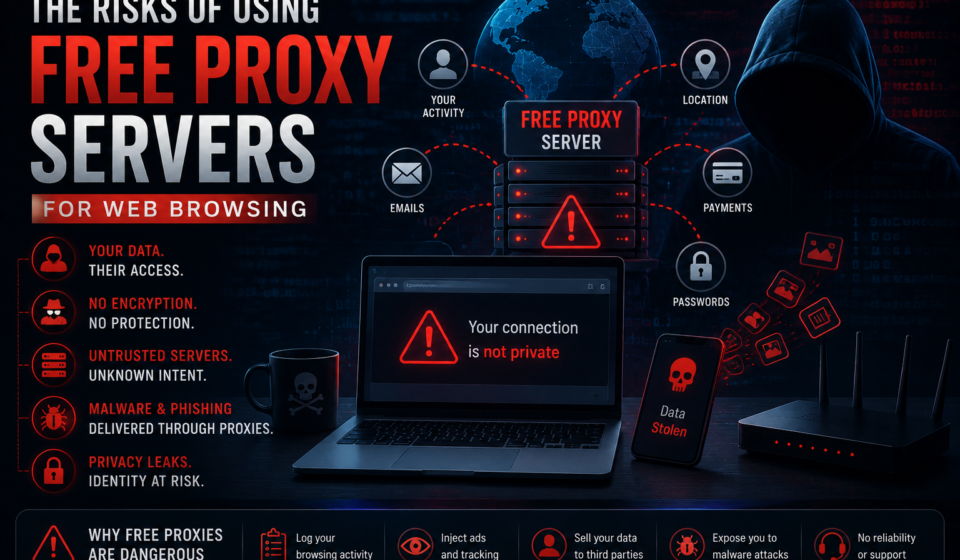

The Risks of Using Free Proxy Servers for Web Browsing
That free proxy promising anonymity might be the most dangerous software running on your machine right now. Here is the complete threat picture — what they do, how they profit, and what your traffic looks like from the other end.
What Is a Free Proxy Server?
A proxy server is an intermediary machine that sits between your browser and the websites you visit. When you configure your browser to use a proxy, every request you make — every URL, every search, every form submission — passes through that third-party server before reaching its destination. The website you visit sees the proxy’s IP address, not yours.
On paper, this offers two things: anonymity (websites don’t see your real IP) and circumvention (you can access content blocked in your region). On paper, it sounds like a reasonable trade for zero cost. In practice, you are handing the keys to your entire internet activity to an unknown operator with no obligation to protect you, no regulatory oversight, and strong financial incentives to exploit what they see.
Free proxy servers are not charities. Servers cost money. Bandwidth costs money. The business model is always you.
“If you are not paying for the product, you are not the customer. You are the product being sold.”
— Security principle applied universally to free internet servicesHow a Free Proxy Intercepts Your Traffic
Here is exactly what happens at the network level when you use a free HTTP/HTTPS proxy:
- Your browser sends all requests to the proxy server instead of the destination website directly.
- The proxy receives your request — including all headers, cookies, and for HTTP connections, the complete request body.
- The proxy forwards a (potentially modified) version of your request to the destination website.
- The response comes back to the proxy first — again, fully readable before it reaches you.
- The proxy delivers the (potentially modified) response to your browser.
At every step, the proxy operator has full visibility into your traffic. On unencrypted HTTP connections, this is trivial. On HTTPS connections, the operator can perform an SSL stripping attack — silently downgrading your encrypted connection to unencrypted HTTP — which a 2023 analysis found active in 38% of tested free proxy services.
// What you THINK happens:
Your browser  →  HTTPS (encrypted)  →  Website

// What SSL stripping ACTUALLY does:
Your browser  →  HTTP (plaintext)  →  Proxy
Proxy         →  HTTPS (encrypted) →  Website

// The proxy reads everything between you and itself.
// Your browser shows no warning. The padlock may still appear.
// Your password: visible. Your session tokens: visible. Everything.
The 8 Serious Risks of Free Proxy Servers
These are not hypothetical edge cases. Each risk below has been documented in peer-reviewed security research, government advisories, or confirmed incident reports. They are listed in order of frequency, not severity — all eight are serious.
Who Actually Runs Free Proxy Servers?
This is the question most users never ask — and the answer is almost always worse than expected. A 2023 investigation by security researchers who acquired and analyzed the ownership and infrastructure of 10,000 free proxy services found the following categories:
- Data brokers and ad networks — operating proxies specifically to build behavioral profiles for sale (most common category, approximately 42% of services studied)
- Cybercriminal operations — running proxies to harvest credentials, inject malware, or build botnets (approximately 23%)
- Nation-state intelligence collection — particularly targeting activists, dissidents, and journalists in specific regions (documented in multiple Citizen Lab reports)
- Legitimate but unsustainable services — genuinely free services that cannot survive without monetizing user data in some form (approximately 31%)
- Truly benign providers — essentially zero at meaningful scale with long-term operation
Free Proxy vs. VPN vs. Tor: A Complete Comparison
| Feature | Free Proxy | Paid VPN (Reputable) | Tor Browser |
|---|---|---|---|
| Traffic encryption | None / HTTP only | AES-256 full tunnel | 3-layer onion encryption |
| IP address hidden from sites | Partial — proxy sees real IP | Yes — VPN sees real IP | Yes — exit node sees nothing |
| DNS leak protection | No — proxy controls DNS | Yes (if configured) | Yes — Tor handles DNS |
| Traffic logging risk | Very High — monetized | Low (audited no-log policy) | Very Low — distributed nodes |
| Malware injection risk | High — 21% inject HTML | None | None from network layer |
| All app traffic covered | No — browser only | Yes — device-wide | No — browser only |
| Speed impact | Unpredictable / often slow | 5–15% reduction | Significant — multi-hop routing |
| Operator accountability | Zero — anonymous operators | Legal entity, auditable | Decentralized — no single operator |
| SSL stripping exposure | High — 38% documented | None — encrypted at client | None within Tor circuit |
| Cost | $0 cash / your data | $3–12/month | Free |
| Appropriate for sensitive tasks | Never | Yes | Yes (with caveats) |
Red Flags: How to Identify a Dangerous Proxy
If you must evaluate a proxy service, or if you suspect you are already using a problematic one, look for these warning signs:
- No privacy policy, or a policy with vague “data sharing with partners” language — this is explicit permission to sell your data.
- Requires browser extension installation — extensions have far broader access than web-based proxies; they can read and modify all your browser traffic.
- No information about who operates the service — legitimate services have a legal entity, contact information, and jurisdiction.
- Free with no visible revenue source — bandwidth is not free. If there is no clear monetization model, you are the product.
- Hosted on bulletproof hosting or jurisdiction-hopping infrastructure — designed to avoid legal accountability.
- Pages load with unfamiliar ads, altered fonts, or unexpected content — your responses are being modified in transit.
- Your HTTPS connections show different certificates than expected — a potential sign of SSL interception.
Safe Alternatives to Free Proxy Servers
The good news: all of the use cases that drive people toward free proxies have legitimate, affordable alternatives that don’t compromise your security.
For Privacy While Browsing: Reputable Paid VPN
A quality paid VPN encrypts all traffic at the device level, hides your IP from every website you visit, and — if you choose a provider with an independently audited no-log policy — provides genuine privacy. The cost is typically $3–10 per month. Providers worth evaluating include Mullvad (known for privacy-first architecture and anonymous payment), ProtonVPN (Swiss jurisdiction, open-source client, independently audited), and IVPN. Look for audited no-log policies, open-source clients, and clear jurisdiction.
For Anonymity: Tor Browser
The Tor network routes your traffic through three volunteer-operated nodes, with each node knowing only the previous and next hop — no single node sees both your identity and your destination. It is slower than a VPN but provides stronger anonymity for high-sensitivity use. The Tor Browser is free, maintained by the non-profit Tor Project, and has undergone extensive security audits. It is the appropriate tool for journalists, activists, and anyone facing genuine state-level surveillance.
For Accessing Work Resources Remotely: Your Employer’s VPN
If your use case is accessing corporate resources while remote, use the enterprise VPN your employer provides. If your organization hasn’t deployed one, that’s a separate conversation worth having with your IT team — a conversation about zero trust network access that replaces traditional VPN for most remote access needs.
For Bypassing Regional Content Restrictions
Use a paid VPN with servers in the required region. The cost is far less than the value of your credentials, browsing history, and device security. Many streaming platforms have specific VPN-compatible plans designed for travelers.
Stop Browsing Blind
Download our Free Proxy Risk Assessment — understand your current exposure in under 5 minutes.
Get the Free AssessmentYour Protection Checklist
- Change passwords for every account you accessed while using the proxy — start with email, banking, and work accounts
- Check your accounts for unauthorized sessions: Google, Apple, Microsoft — review signed-in devices immediately
- Enable MFA/2FA on all accounts that support it — even if credentials were taken, a second factor blocks access
- Review browser extensions — remove any you don’t recognize or that request broad “read and change site data” permissions
- Run a full malware scan with a reputable endpoint security tool to check for injected scripts or backdoor processes
- Check your credit/financial statements for unauthorized transactions if you accessed financial services through a proxy
- Reset browser cookies and saved passwords — they may have been copied during your proxy session
- Identify the legal entity behind the service — name, registered jurisdiction, contact information must be public and verifiable
- Read the privacy policy — specifically: what data is logged, how long it is retained, and who it is shared with
- Search for independent security audits — no-log claims mean nothing without third-party technical verification
- Verify the business model — if you cannot identify how the service generates revenue, assume you are the revenue
- Check for open-source clients — proprietary clients cannot be independently verified; open-source can
- Look for jurisdiction: services registered in 14-Eyes countries may be subject to government data requests without notifying users
- Test for DNS leaks after connection — tools like dnsleaktest.com confirm whether your DNS requests are truly protected
- Deploy DNS filtering to block known free proxy and web proxy domains across your network
- Implement web proxy detection in your firewall or CASB — flag and block encrypted tunnel traffic to unauthorized proxy endpoints
- Restrict browser extension installation via MDM policy — whitelist only approved extensions organization-wide
- Include free proxy risks explicitly in security awareness training with concrete examples of credential theft scenarios
- Provide employees with a sanctioned, privacy-respecting alternative for legitimate use cases — removing the need removes the behavior
Frequently Asked Questions
Conclusion
The appeal of free proxy servers is completely understandable: privacy feels like it should be a right, not a subscription. The problem is that the economics of running internet infrastructure do not bend to that aspiration. Someone pays for every server, every gigabyte of bandwidth, every moment of uptime. When that someone is not you, the question is not whether you are paying — it is what currency you are paying in.
The answer, for free proxy servers, is consistently your browsing history, your credentials, your session cookies, your device security, and your genuine anonymity. The promise of privacy delivered through an infrastructure specifically designed to exploit your trust is not a paradox — it is a business model.
Use Tor for high-sensitivity anonymity. Use a reputable, audited, paid VPN for everyday privacy. Use your employer’s sanctioned tools for work. And treat any service promising both “free” and “private” as a phrase that cannot be simultaneously true at scale.
The internet is not a safe place for blind trust. Neither is any proxy that costs you nothing.